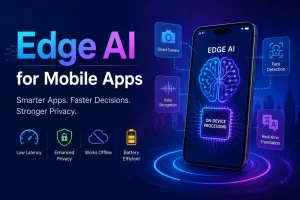
In 2026, businesses are increasingly embedding AI directly into mobile applications, allowing devices to process data locally instead of sending every request to the cloud. This shift has made mobile apps faster, more private, and more reliable, especially for users who expect instant responses regardless of their internet connection.
From facial recognition and voice assistants to personalized recommendations and real-time language translation, on-device machine learning is transforming how mobile applications deliver intelligent experiences. Instead of waiting for a remote server to analyze data, smartphones can now perform complex AI tasks using their own processing power. Apple’s Neural Engine, Android’s Neural Networks API (NNAPI), and modern AI chipsets have made this possible even for resource-intensive applications.
In this guide, we’ll explore how on device machine learning works, how it differs from cloud-based AI, the best frameworks for iOS and Android, common implementation challenges, and the security practices businesses should follow to build a trustworthy mobile development company for apps.
What Is On-Device Machine Learning?
On-device machine learning is the process of running artificial intelligence models directly on a smartphone or tablet instead of relying on remote cloud servers for every prediction or decision. Once a trained model is embedded into a mobile application, it can analyze information locally using the device’s processor.
The on-device machine learning from an AI development company keeps most computations within the application itself. This significantly reduces network dependency while improving speed, privacy, and responsiveness.
Modern mobile operating systems provide specialized frameworks that simplify this process:
- Core ML enables developers to integrate optimized machine learning models into iOS applications.
- TensorFlow Lite supports lightweight AI models for Android devices and cross-platform mobile applications.
- Google ML Kit offers ready-to-use machine learning capabilities such as text recognition, barcode scanning, image labeling, and language translation.
- ONNX Runtime Mobile allows businesses to deploy AI models across multiple mobile platforms with greater flexibility.
Why Are Businesses Moving AI Processing to Mobile Devices?
Here’s why more businesses are investing in on-device machine learning.
Faster User Experiences
Speed plays a major role in user satisfaction. When an AI model runs directly on a mobile device, it no longer needs to send data to a remote server and wait for a response. This eliminates network delays and enables near-instant predictions. These real-time interactions create a smoother experience and reduce user frustration.
Stronger Data Privacy
Consumers are increasingly concerned about how their personal information is collected and stored. On-device machine learning addresses this challenge by processing sensitive data locally whenever possible.
Images, voice recordings, health information, and location data can remain on the user’s device instead of being transmitted to cloud servers. This not only builds customer trust but also helps businesses align with privacy regulations and internal security policies.
Reliable Performance Without Internet Access
Many mobile applications are expected to function even when internet connectivity is weak or unavailable. On-device AI enables features to continue working offline because the machine learning model is already stored within the application.
This is especially valuable for industries such as healthcare, logistics, travel, and field services, where users may operate in remote locations. Features like document scanning, language translation, image recognition, and predictive text can continue to perform without interruption.
Lower Cloud Infrastructure Costs
Running AI workloads entirely in the cloud requires continuous computing resources, storage, and bandwidth. As user numbers grow, these operational costs can increase significantly.
Processing routine AI tasks on the device reduces the number of server requests, helping businesses optimize cloud usage while maintaining application performance. Cloud resources can then be reserved for model training, analytics, and other compute-intensive operations instead of handling every user interaction.
Personalized User Experiences
Every customer interacts with an application differently. On-device machine learning allows apps to adapt based on individual usage patterns without exposing personal information externally.
Because these recommendations are generated locally, personalization becomes faster and more privacy-friendly.
How Does On-Device Machine Learning Work Inside Mobile Apps?
Understanding this workflow helps businesses make informed decisions about development, deployment, and long-term maintenance.
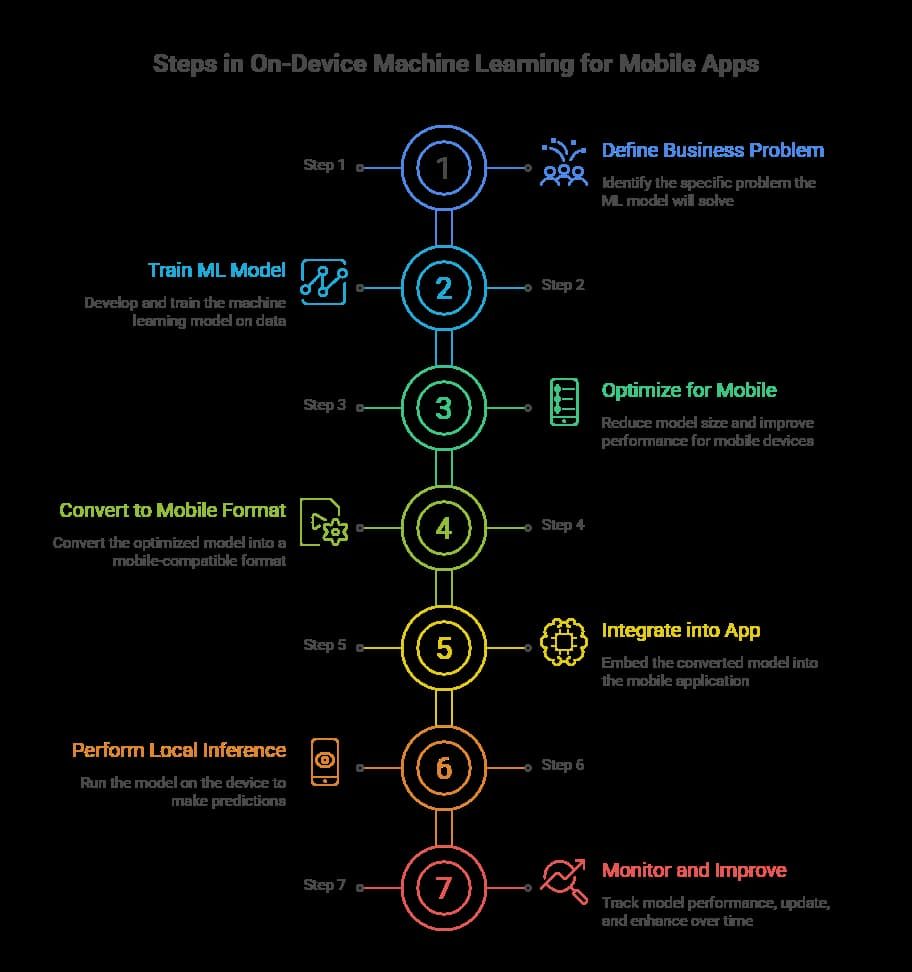
Step 1: Define the Business Problem
Every successful AI implementation starts with a clearly defined objective. Rather than adding artificial intelligence for the sake of innovation, businesses should identify a problem that machine learning can solve effectively. Establishing measurable goals ensures the AI solution delivers tangible business value.
Step 2: Train the Machine Learning Model
Once the objective is defined, hire mobile app developers to collect relevant datasets and train a machine learning model using cloud-based infrastructure. During this stage, the model learns to recognize patterns, classify information, or make predictions based on historical data.
Training typically occurs on high-performance servers rather than mobile devices because it requires significant computing power and large datasets.
Step 3: Optimize the Model for Mobile Devices
A model trained for desktop or cloud environments is often too large and resource-intensive for smartphones. Before deployment, it must be optimized to reduce its size while maintaining accuracy.
Developers commonly use techniques such as model quantization, pruning, and compression to minimize memory usage, reduce processing time, and improve battery efficiency.
This optimization ensures the model performs smoothly even on devices with limited hardware capabilities.
Step 4: Convert the Model into a Mobile-Compatible Format
Different operating systems require models in specific formats.
For example:
- Core ML models are designed for iOS applications.
- TensorFlow Lite supports Android and cross-platform development.
- ONNX Runtime Mobile enables deployment across multiple environments.
Converting the model ensures compatibility with the target platform while allowing developers to take advantage of hardware acceleration features.
Step 5: Integrate the Model into the Application
The optimized model is then embedded into the mobile application and connected to the required user interface components and business logic.
At this stage, developers also configure permissions, data handling policies, and application workflows to ensure secure operation.
Step 6: Perform Local Inference
Once deployed, the application uses the model to analyze user inputs directly on the device. This process, known as inference, generates predictions without requiring cloud communication for every request.
Depending on the device, inference may run on the CPU, GPU, or a dedicated neural processing unit (NPU), enabling faster execution and improved energy efficiency.
Step 7: Monitor, Update, and Improve
Machine learning integration doesn’t end after launch. As user behavior changes and new business requirements emerge, models need periodic updates to maintain accuracy and relevance.
Businesses should establish secure update mechanisms, monitor application performance, and continuously evaluate model effectiveness. Regular testing also helps identify compatibility issues with new operating system versions and device hardware.
iOS vs. Android: Understanding the Differences in On-Device Machine Learning
| Feature | iOS | Android |
| Primary Framework | Core ML | TensorFlow Lite, ML Kit |
| Hardware Acceleration | Apple Neural Engine (ANE), GPU, CPU | NNAPI, GPU, CPU, NPU |
| Device Ecosystem | Limited Apple devices | Wide range of manufacturers and hardware |
| Performance Consistency | Highly optimized due to standardized hardware | Varies depending on device specifications |
| Model Deployment | Core ML models (.mlmodel) | TensorFlow Lite (.tflite), ONNX |
| Security | Secure Enclave, App Sandbox, Code Signing | Play Integrity API, Keystore, App Sandbox |
| Offline Support | Excellent | Excellent |
| Development Complexity | Easier due to controlled ecosystem | Higher because of device fragmentation |
iOS Offers a More Controlled AI Environment
Apple designs both the hardware and software that power its devices, giving developers a consistent environment for deploying machine learning models. This tight integration allows Core ML to work seamlessly with the Apple Neural Engine (ANE), CPU, and GPU, automatically selecting the most efficient hardware for AI processing.
Because there are fewer hardware variations, developers spend less time optimizing applications for different devices. Performance remains relatively consistent across supported iPhones and iPads, making it easier to predict how AI-powered features will behave after deployment.
Android Provides Greater Flexibility Across Devices
Android offers developers more flexibility but also introduces additional complexity. Since the operating system runs on devices from multiple manufacturers, hardware capabilities can vary significantly between entry-level smartphones and premium flagship models.
Frameworks such as TensorFlow Lite and Google ML Kit help developers optimize machine learning models for different hardware configurations. Android’s Neural Networks API (NNAPI) also enables applications to utilize available AI accelerators, GPUs, or CPUs depending on the device.
Key Security Risks When Integrating On-Device Machine Learning
Businesses should understand the most common threats before deploying AI-powered mobile applications.
Model Theft and Intellectual Property Loss
Developing a high-performing machine learning model often requires significant investment in data collection, training, and testing. If attackers extract the model from the application, they may copy proprietary algorithms or use them to build competing products.
Encrypting models, obfuscating application code, and implementing secure storage mechanisms help reduce the risk of unauthorized access.
Reverse Engineering
Cybercriminals frequently analyze mobile applications to understand how they work. Without proper protection, attackers can reverse engineer application binaries to uncover embedded AI models, business logic, and sensitive implementation details.
Code obfuscation, runtime protection, and anti-tampering techniques make reverse engineering significantly more difficult.
Model Tampering
An attacker may attempt to replace or modify a machine learning model after it has been installed on a device. A compromised model could generate incorrect predictions, disrupt application functionality, or create security vulnerabilities.
Businesses should verify model integrity through digital signatures, checksum validation, and secure update mechanisms before allowing new models to run.
Adversarial Attacks
Machine learning models can sometimes be manipulated by carefully crafted inputs that appear normal to humans but confuse the AI system.
For example, a fraud detection model might incorrectly classify malicious activity as legitimate, or an image recognition system could misidentify an object because of subtle visual changes.
Testing models against adversarial inputs helps improve resilience before deployment.
Sensitive Data Exposure
Although on-device processing reduces cloud data transmission, applications still collect and temporarily store user information during inference. If this data isn’t handled securely, attackers may gain access to personal information through compromised devices or insecure local storage.
Developers should encrypt sensitive data, minimize local storage, and use secure platform APIs whenever possible.
Best Practices for Maintaining On-Device Machine Learning Models
Businesses that treat model maintenance as an ongoing process deliver more reliable AI experiences, stronger security, and better long-term performance.
Monitor Model Performance in Real-World Conditions
A model that performs well during testing may behave differently when exposed to real users. Factors such as changing user preferences, new data patterns, device limitations, or environmental conditions can affect prediction accuracy over time.
Update Models Without Disrupting Users
Machine learning models should be updated carefully rather than replaced abruptly. A phased rollout minimizes risk and allows Android developers to compare the new model with the previous version.
Optimize Models for New Devices
Every year, smartphones introduce faster processors, improved Neural Processing Units (NPUs), and upgraded AI accelerators. While newer hardware enables more advanced models, older devices must still receive a smooth experience.
Retrain Models with Fresh, High-Quality Data
Machine learning models become less effective if they rely on outdated training data. Consumer behavior, language patterns, purchasing habits, and visual content constantly change, making periodic retraining essential.
Plan for Long-Term AI Scalability
As applications expand, AI capabilities often grow beyond their original scope. Designing models from mobile UI/UX design services with future scalability in mind reduces redevelopment costs and simplifies future enhancements.
Future Trends in Safe On-Device Machine Learning for Mobile Applications
Understanding these trends helps organizations make technology decisions that remain relevant for years rather than months.
AI-Specific Mobile Chips Will Become the Standard
Modern smartphones already include dedicated Neural Processing Units (NPUs) that handle AI workloads more efficiently than traditional CPUs. Future devices will continue expanding these capabilities, allowing developers to deploy larger and more sophisticated machine learning models directly on smartphones.
This evolution will enable applications to process images, speech, natural language, and predictive analytics faster while consuming less battery power. As hardware improves, businesses will be able to introduce richer AI experiences without depending heavily on cloud infrastructure.
Privacy-First AI Will Drive Product Innovation
Privacy has become a major factor in customer purchasing decisions and regulatory compliance. Processing sensitive information directly on the device significantly reduces data exposure and gives users greater confidence in AI-powered applications.
Smaller Models Will Deliver Bigger Results
Large language models and advanced neural networks often require significant computing resources. The next generation of mobile AI focuses on making these models smaller without sacrificing performance.
Personalized AI Will Run Securely on Individual Devices
Users increasingly expect applications to adapt to their individual preferences rather than delivering identical experiences to everyone. Future on-device AI will continuously learn from local interactions while keeping personal information on the user’s device.
Examples include:
- Personalized shopping recommendations
- Adaptive fitness coaching
- Individual typing suggestions
- Customized learning experiences
- Smart productivity assistants
Because personalization occurs locally, businesses can improve engagement while reducing privacy concerns associated with centralized data collection.
Stronger Security for AI Models
As machine learning becomes more valuable, protecting AI models themselves is becoming just as important as protecting application code. Businesses are investing in stronger safeguards to defend against model theft, tampering, and reverse engineering.
- Future security strategies will include:
- Hardware-backed encryption
- Secure enclaves for AI execution
- Runtime application protection
- Advanced model obfuscation
- Continuous integrity verification
These measures help safeguard intellectual property while ensuring AI features remain reliable even in hostile environments.
Edge AI Will Power Smarter Connected Devices
On-device intelligence will increasingly extend beyond smartphones into wearable devices, connected vehicles, industrial equipment, retail systems, and smart home products. Instead of relying solely on centralized cloud processing, these edge AI for mobile apps will make decisions locally for faster and more reliable operation.
Conclusion
Integrating on-device machine learning into iOS and Android applications safely requires much more than selecting an AI framework or deploying a trained model. Success depends on balancing intelligence with security, privacy, performance, and long-term maintainability.
Businesses that follow a structured implementation strategy from selecting the right framework to protecting intellectual property over time can deliver AI-powered mobile apps. As mobile hardware becomes more capable and privacy expectations continue to rise, on-device AI will play an increasingly central role in creating fast, secure, and personalized digital experiences.
FAQs
1. What is on-device machine learning in mobile app development?
On-device machine learning allows AI models to run directly on a user’s smartphone instead of relying on cloud servers. This enables faster processing, improved privacy, offline functionality, and reduced latency for features like image recognition, voice assistance, and predictive recommendations.
2. Is on-device machine learning more secure than cloud-based AI?
Yes. On-device machine learning keeps sensitive user data on the device, reducing the need to transmit personal information over the internet. When combined with encryption, secure storage, and model protection techniques, it offers a stronger privacy and security posture.
3. Which frameworks are commonly used for on-device machine learning on iOS and Android?
Developers commonly use Core ML for iOS, TensorFlow Lite for Android and cross-platform development, and ONNX Runtime Mobile for deploying optimized AI models across multiple mobile platforms.
4. How can businesses safely integrate AI features into mobile applications?
Businesses should start by selecting the right machine learning framework, optimizing models for mobile devices, encrypting AI models, securing APIs, protecting user data, performing regular security testing, and continuously monitoring model performance after deployment.
5. What are the benefits of integrating on-device AI into mobile apps?
On-device AI improves app responsiveness, enables offline functionality, enhances user privacy, reduces cloud infrastructure costs, lowers network latency, and delivers personalized experiences without continuously sending user data to external servers.