It’s a popular saying that goes ‘a strong base supports a strong structure.’ And it’s the same with the mobile apps. Because these apps don’t just stay on the language flexibility. Instead, there is a great role in making the base flexible and advanced. So, a strong mobile app architecture plays a crucial role in app success. But if you want to what is it and how it works, let’s dive in.
What is mobile app architecture?
Every software and app is different from one another. And if you want to transform ideas into real-time apps you need a strong structure. So, mobile app architecture refers to a structured set of rules for development. This framework ensures the app aligns with business goals and industry standards. Plus keeping the user experience in mind and app success. The mobile app architecture design serves as the blueprint for creating advanced apps. A solid architecture is essential for creating scalable, secure, and enterprise application modernization.
Compatibility
It is the cornerstone of mobile app architecture. Regardless of how feature-rich an app may be, its value reduces if it fails to work. So, a well-designed architecture ensures the app can receive data effortlessly. Compatibility fosters user satisfaction, making the app adaptable to evolving landscapes.
Performance
Performance is critical in determining the success of a mobile app. Users expect fast, responsive, and smooth applications. A reliable architecture optimizes resources, manages data, and reduces bottlenecks. It ensures interaction between app components and intuitive functionality.
Scalability
Businesses build applications for the future, not just today. Scalability is a vital aspect of mobile app architecture to handle increasing workloads. Scalable architecture apps allow firms to integrate features, improve functionality, and grow their audience.
Security
Security is non-negotiable in mobile app development. As mobile app usage increases, so do concerns about data breaches and privacy risks. A robust architecture prioritizes security by implementing encryption, secure protocols, and threat prevention measures at the foundational level. This proactive approach safeguards user data and builds trust in your application.
Layers in mobile app architecture
Here are some of the crucial layers to see in mobile app architecture.
Presentation layer
The presentation layer is the user-facing aspect of the app. And it includes the design, UI, and UX. It determines how users interact with the app visually and tactically. The presentation layer strives to create an intuitive and appealing interface that enhances user satisfaction.
- User Interface: Focuses on design elements such as text placement, colors, and aesthetics.
- User Experience: Ensures smooth navigation, logical workflows, and customer engagement.
Business layer
The business layer handles the logical operations and data exchange within the app. It governs workflows, data validation, caching, and error management. This layer can be located on the server or the device for the app’s needs.
Key responsibilities include:
- Managing workflows
- Validating data
- Logging activities
- Handling exceptions
Data layer
The data layer manages data transactions, service agents, and data access elements. It comprises:
- Persistence Layer: Handles data access through APIs.
- Network Layer: Manages network communication, routing, and fault reporting.
Some of the different architecture mobile app examples
Let’s see how it’s different to design architecture for various OS.

Android mobile app architecture
Android app architecture focuses on clean design, ensuring seamless layered interaction. The key principles include avoiding repetitive code and leveraging interfaces. Clean architecture emphasizes the domain layer, which uses interfaces to maintain independence. This approach simplifies updates and improves app maintainability.
iOS mobile app architecture
iOS app architecture follows a tested, structured approach divided into four layers. And each layer contributes to creating secure, efficient, and visually appealing apps.
- Core OS (Kernel Level): Manages security and file system interactions.
- File Control Section: Provides database access and essential core services.
- Media Layer: Includes tools for processing media formats.
- Cocoa Touch (Interface Layer): Supports the creation of user interfaces.
Hybrid mobile app architecture
The hybrid architecture combines native and advanced web applications. It uses frameworks like HTML, CSS, and JavaScript. This approach leverages plugins to access native platform functionalities. While hybrid apps are cost-effective, they may not suit complex, feature-rich applications.
Cross-platform mobile app architecture
The cross-platform architecture uses a single codebase for apps running on multiple platforms. Frameworks like Flutter, React Native, and Xamarin are popular choices. This approach delivers near-native user experiences while reducing development time and costs.
Key pointers to consider for choosing mobile app architecture
Here are the pointers you must keep in mind to architecture mobile apps perfectly.

Target audience
Your app’s success hinges on understanding the preferences and user behaviors. A detailed analysis of your audience, device preferences, and usage patterns offers insights into platforms. If your audience is Android users, then focusing on Android architecture will give better results. For an iOS-centric audience, invest in Apple-specific frameworks. A thorough understanding of your users ensures the app meets their needs.
User Experience
The user experience should be at the core of your architecture decisions. Depending on the type of app you build, the UX needs will vary. These often require cross-platform compatibility as employees use different devices. Focus on seamless functionality and performance across platforms. The mobile app architecture needs to deliver visually appealing and interactive user experiences. Platform-specific architecture may be a better choice to utilize native UI/UX capabilities.
Simple functionality
The type and scope of your app’s functionality determine its architectural requirements. Different use cases demand different approaches. Apps designed primarily for content may benefit from cross-platform solutions. These require robust native functionality for features like offline access and seamless task execution. Apps that handle large data may demand high-performing architectures.
Platform focus
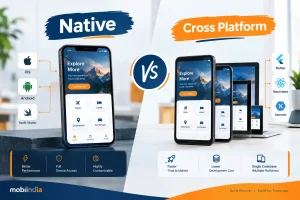
Decide whether your app will target a single platform or multiple platforms. The native apps offer the best experience, leveraging platform-specific tools and functionalities. Cross-platform frameworks offer a broader reach with a single codebase. Balancing platform focus with your target audience’s preferences helps optimize resource allocation.
Team skillset
Your team’s expertise can dictate the feasibility of mobile app architecture choices:
- Native development: Requires proficiency in platform-specific languages (Swift for iOS, or Java for Android).
- Hybrid development: Relies on knowledge of web-based technologies like HTML, CSS, and JavaScript. Frameworks like Ionic or Apache Cordova are valuable for creating hybrid apps.
- Cross-platform development: Familiarity with tools like Flutter and React Native is crucial for building cross-platform apps.
Post maintenance
A good mobile app backend architecture is maintainable and scales as the app grows. Plan for future growth by choosing an architecture for increased user loads. And even additional features without performance issues. Ensure your app’s architecture is modular and well-documented. So, it makes it easier to debug, update, and expand.
Conclusion:
A well-designed mobile app architecture is the foundation of a successful application. Businesses can create apps that meet user expectations and thrive in competitive markets. Or you can consult a mobile app development company for more assistance.
FAQs
1. What is a mobile application’s architecture?
It includes the tech stack, data flow, UI/UX, and everything else that contributes to an app’s functionality and usefulness. Along with defining their interactions, the architecture also specifies the points of entry for users and other components.
2. What is app layout design?
The group of visual components that make up a mobile application’s structure is called an app layout. This covers all of the visual components of the user interface, such as the UI kit, templates, and app design guidelines.
3. What is the price of developing a mobile application?
As you can see, there are a lot of variables that might affect how much it costs to develop a mobile app. The minimum cost to develop an app is between $5,000 and $10,000. The cost of a more sophisticated mobile application might range from $50,000 to $75,000.
4. What are the advantages of mobile apps for businesses?
By putting a mobile app into place, your company may stand out from the competition and offer services that contemporary customers not only value but now anticipate.
5. What are the top five advantages of developing mobile apps?
- Enhanced Effectiveness.
- Provides Greater Scalability.
- Data Protection.
- Integrate software seamlessly
- Easy maintenance.